How Jane works
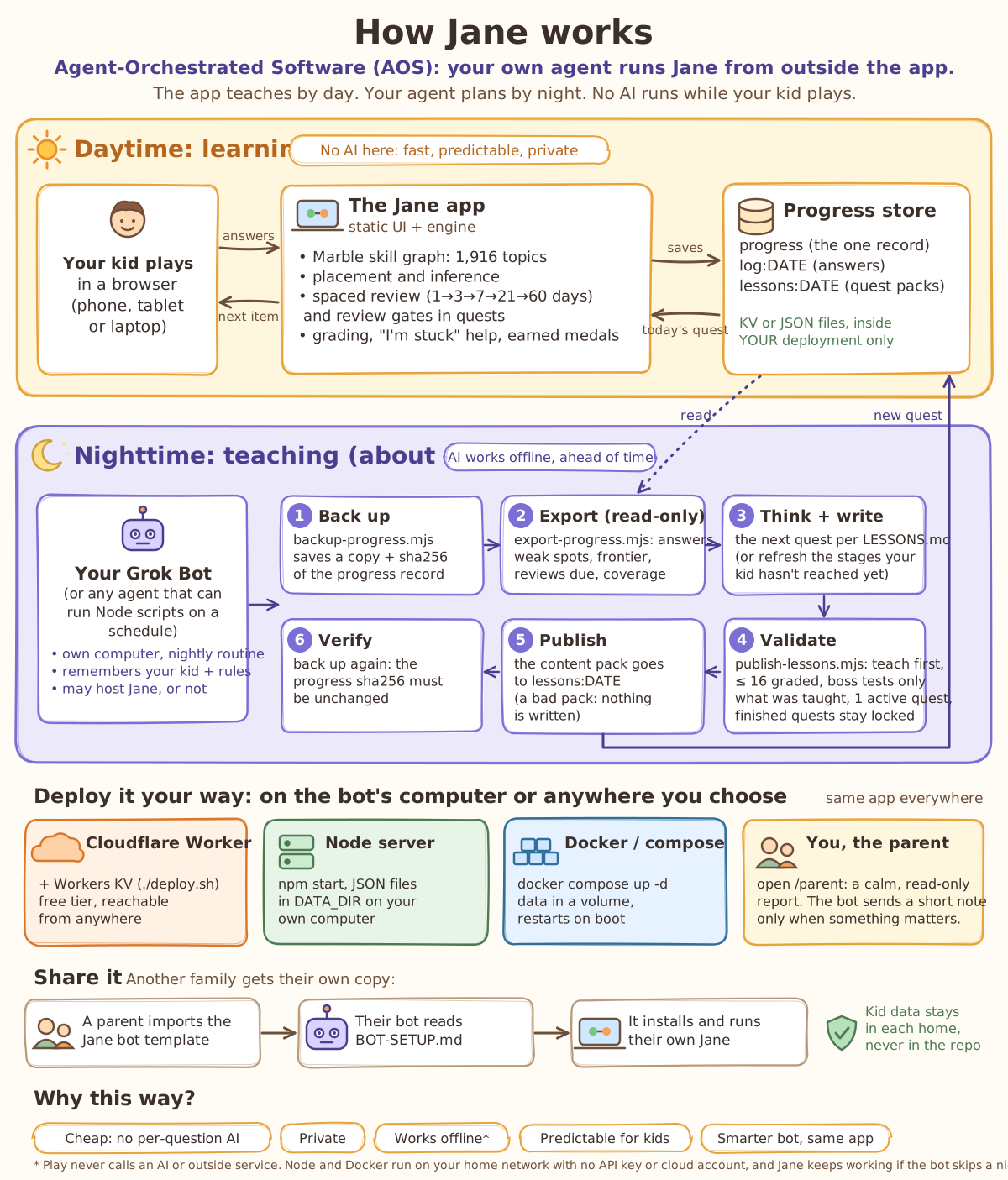
Jane splits the job in two. The app teaches your kid during the day. Your own AI agent plans the next lesson at night. The agent works from outside the app, so there is no AI inside Jane talking to your kid.
Agent-Orchestrated Software (AOS)
Kent Langley's name for this way of building and sharing software:
Agent-Orchestrated Software (AOS): software whose adaptation, content, and upkeep are orchestrated by the user's own AI agent, working from outside the app. The agent may host the app, but doesn't have to. The app can include AI of its own, but doesn't need to.
Jane is an example. Jane happens to have no AI inside. Your agent (Grok Bot, or any agent that can run small programs on a schedule) reads the day's progress and writes the next quest offline each night. It may also run Jane on its own computer, or Jane can live somewhere you choose while the agent just does the nightly work.
Daytime: learning no AI here
- Your kid plays in a web browser on a phone, tablet or laptop.
- The Jane app checks each answer, gives hints, picks the next question, schedules reviews and hands out medals. It follows rules written into its own code, so it's fast and predictable, and the same answers always lead to the same thing.
- Progress is saved in storage that belongs to your setup: your Cloudflare account, or a folder on your own computer.
Nighttime: teaching about 1 AM
A scheduled routine on your agent's computer does six steps:
- Back up your kid's progress.
- Read the day: answers, struggles, strengths, what's ready to learn next and what's due for review.
- Write the next quest following Jane's teaching rules, or freshen up the parts of today's quest your kid hasn't reached yet.
- Check it. Jane's validator refuses a quest that breaks the rules: too long, testing something that wasn't taught, or changing a quest that's already finished.
- Publish it, so it's waiting in the morning.
- Double-check that your kid's progress wasn't changed.
Your agent only messages you when something matters: a problem, review falling behind, a struggle that keeps coming back, or a milestone.
Run it where you like
It's the same app everywhere, on the agent's computer or anywhere you choose:
Cloudflare
A free Cloudflare account. Reachable from anywhere.
A home computer
Any computer with Node.js. Progress is a folder of files.
Docker
One command, restarts on its own, keeps data in a Docker volume.
You, the parent, open the parent report (/parent): a calm, read-only page with
progress, quests, reviews and every answer.
Why build it this way?
Cheap
No AI charges per question. Jane runs on a free tier or any computer.
Private
Your kid's answers stay in your setup, and no AI sees them while they play.
Keeps working
Playing never calls an AI or outside service. If the agent skips a night, Jane falls back to its built-in questions and reviews.
Predictable for kids
Jane only shows what was written and checked ahead of time. No surprises, no off-topic chats.
Smarter agent, same app
When your agent gets better, the lessons get better, without changing the app.
How AOS compares
| AOS (like Jane) | Online service (SaaS) | Traditional installed software | |
|---|---|---|---|
| Where it runs | Wherever you choose: your agent's computer, your own machine or a cloud account you own | The company's servers | Your own device |
| Who adapts and improves it | Your own AI agent, from outside the app (the code's authors still ship updates) | The company, the same for everyone | The company, through new versions |
| Where your data lives | In your own setup | On the company's servers | On your device |
| How you get it | Open code plus a recipe your agent follows (a bot template or a setup guide) | Sign up for an account | Installer, download or app store |
| What it costs | Your hosting (often free) plus the agent you already use | Subscription, per seat or ads | One-time purchase or license |
The technical version of this page: docs/ARCHITECTURE.md and docs/NIGHTLY.md.